
Poorly organized React components drain your mental energy, slow down your productivity, and increase your cognitive load.
A well-organized component is the primary building block of a maintainable codebase.
In today’s article, I’ll share a simple yet effective approach to turn your React component files into readable and maintainable pieces of code.
Why Is It Important To Have Organized React Component Files?
As I said earlier:
A well-organized component is the primary building block of a maintainable codebase.
When you structure your files clearly, you make things obvious, which significantly reduces the time spent navigating and mentally mapping your React components.
This frees up mental energy for solving the problem at hand instead of constantly searching for code pieces.
Following a concrete approach and structure will also help your teammates and company because it will make it easier for others to onboard and get to know the project must faster.
Make your React component file structure obvious, so you and your teammates don’t spend time into searching or navigating throughout the code.
Think of Your Component File In Terms of Layers
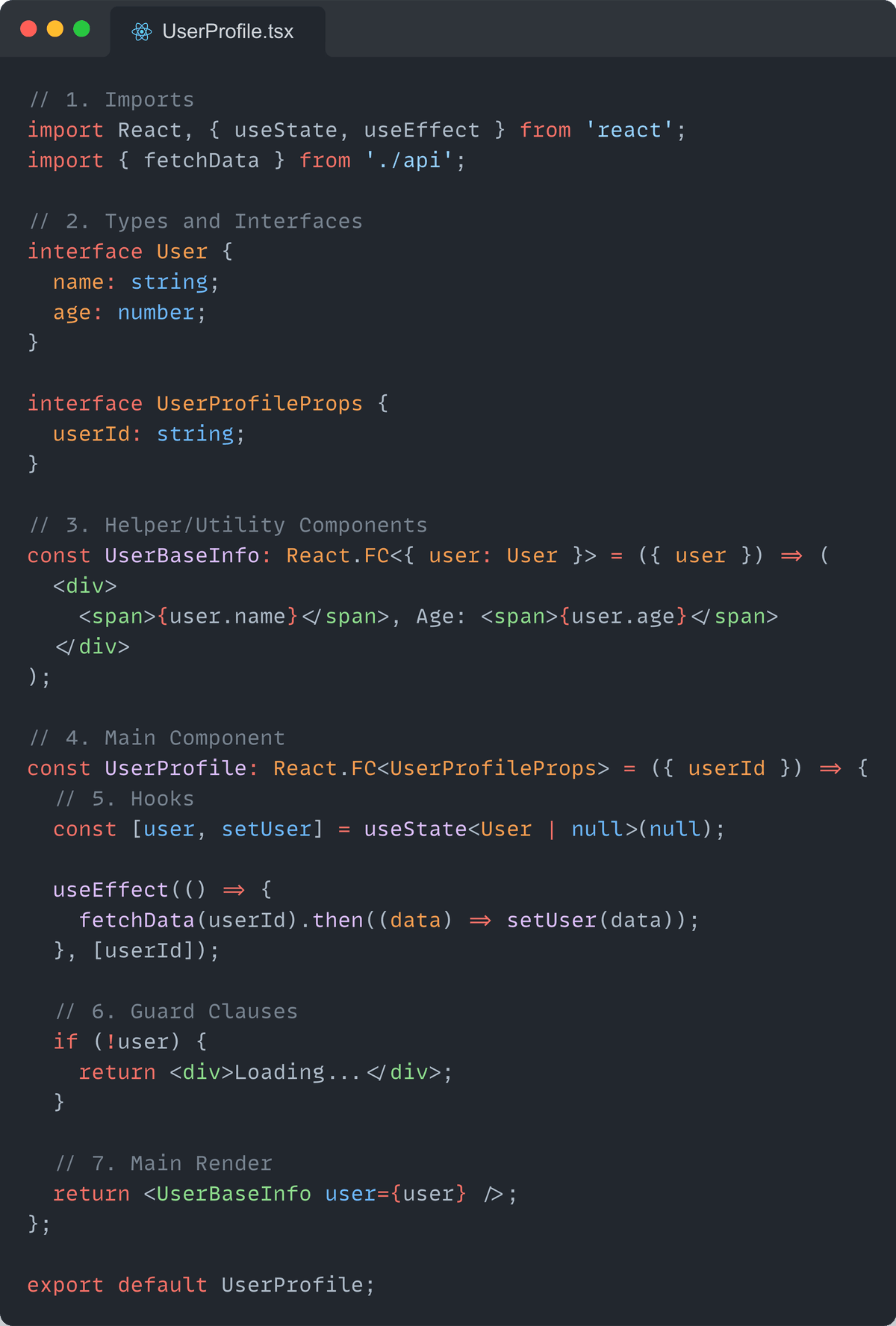
Think of your component file as a serious of clearly defined layers, each serving a specific purpose.
Personally, I follow these layered approach:
1. Imports
Move the dependencies at the top.
Clearly show external libraries and other components that your React component depend on.
2. Types and Interfaces
Define your types and interfaces immediately after imports.
This clarifies the structure of the data your React component will handle.
3. Helper/Utility Components
Define smaller components that your main component will use.
Keeping these components together enhances readability and removes the unnecessary back and forth between files.
However, if these helper components become too big, consider extracting them into separate files.
4. Main Component
Now, define the main component.
5. Hooks
Inside your main component, place the hooks, both custom hooks and React hooks, at the top of the component.
This shows clearly how your React component works with data and effects.
6. Guard Clauses
Then, add guard clauses, if necessary, to handle logical conditions and edge cases, and return early.
This keeps the main logic clean and straightforward.
7. Main Render
Add your component’s main render at the end, showcasing the happy path scenario and final structure of the component.
Example
Benefits of Following The Layered Structure
This clear layered structure makes it simple to understand the component’s flow from start to finish.
It reduces confusionandcognitive load, speeds up debugging, and makes your components easier to maintain over time.
Try to optimize your components so they can be read from top to bottom.
This way, a person can grasp what is going on by reading your component file from the beginning to the end without switching context.
📋 Recap
- A well-organized component is the primarily building block of a maintainable codebase.
- Use a layered approach for structuring your React component files - Imports, Types and Interfaces, Helper/Utility Components, Main Component, Hooks, Guard Clauses, Main Render.
- Try to optimize your components to be read from top to bottom.